Staff & Domestic Help Management

Every Domestic Helper & Community Staff Accounted For.

Verified attendance records for every domestic helper and community staff member — so your vendor invoices are accurate, your gate is accountable, and your residents never have to call the guard to find out if their maid has arrived.

25,000+ Housing Societies
4.7+ on App Stores
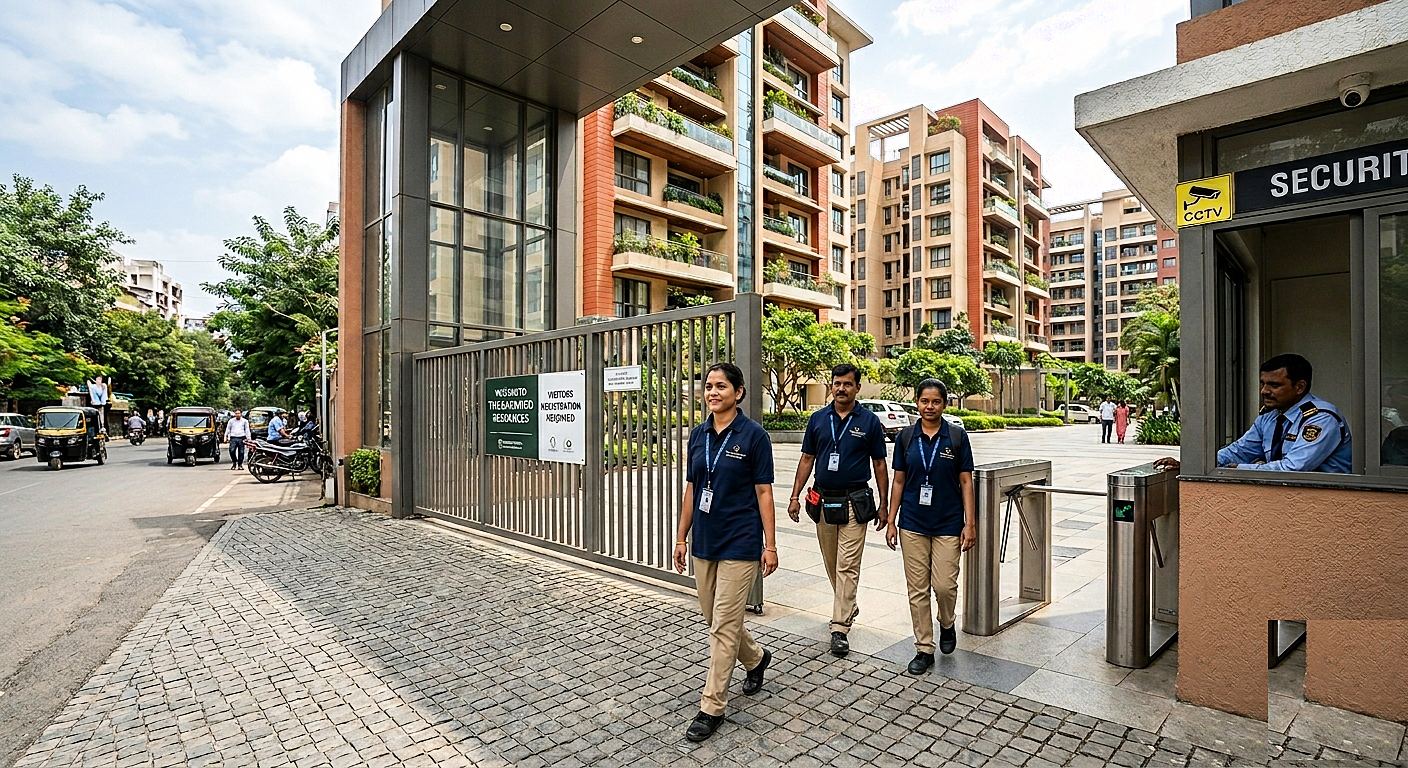
Domestic helpers checking in with a security guard at an apartment complex gate

Staff Attendance

48 of 50 checked in today

Blacklisted

Entry blocked · Reported by Flat 7C

Staff / Domestic Help Management

Full visibility into who is working in your community — and who isn't.

Attendance data Management Committees (for Community Staff) and Residents (for their Domestic Help) can actually use.

Helper check-in and check-out notifications

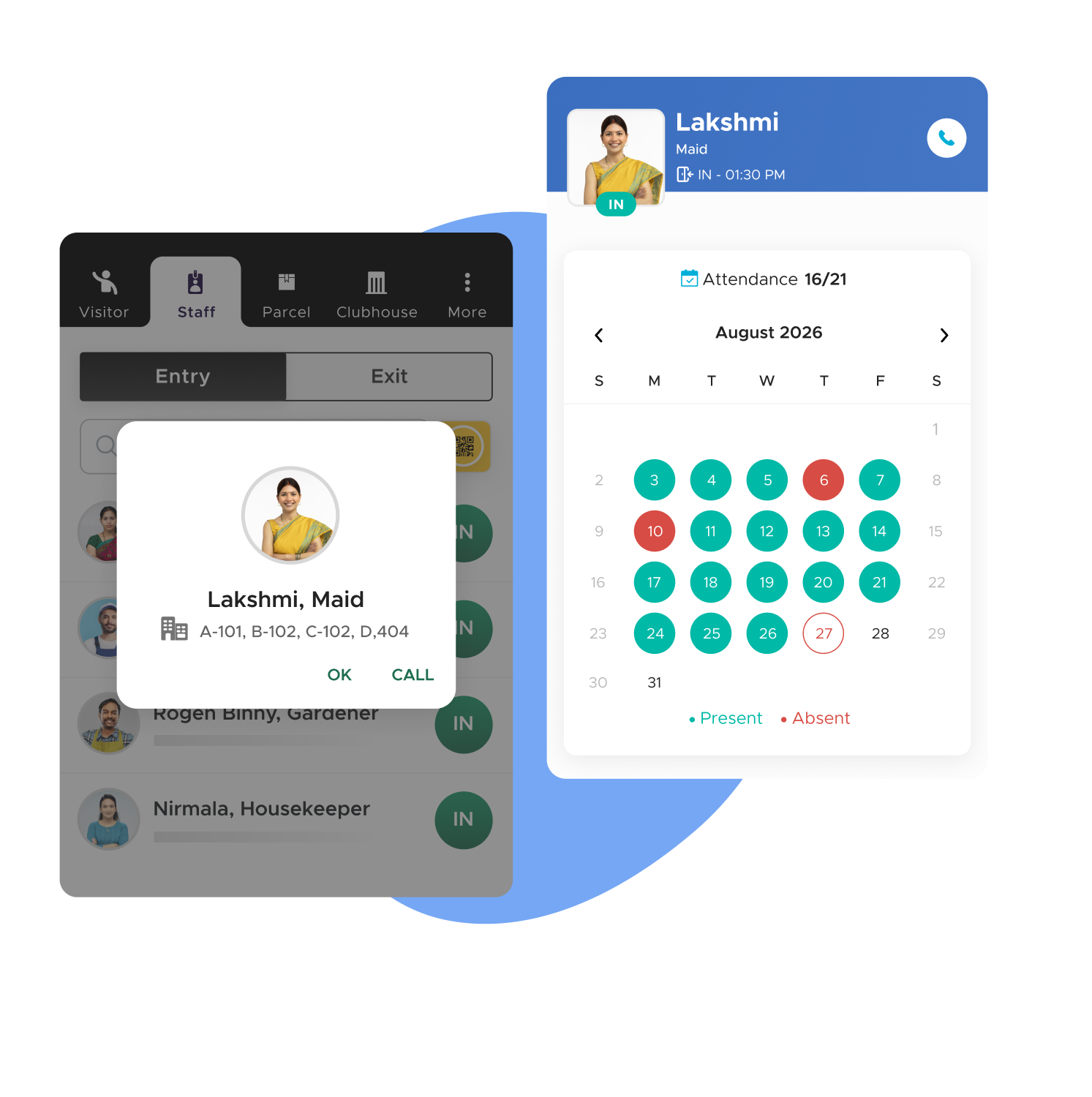
The moment a registered helper enters or exits the gate, the resident gets a notification with the helper's name, photo, and timestamp. No phone call to the gate. No guessing. For residents who depend on household help arriving on time — elderly residents, working parents, residents managing medical visits at home — this is the feature that changes the texture of daily life.

Key Advantages
  • Instant notification on check-in and check-out — no manual follow-up needed
  • Helper's photo shown in the notification — resident can confirm it is the right person
  • Works for maids, cooks, drivers, nannies, and any registered helper category
  • Notification channel is clean and ad-free — residents trust it and read it
  • Check-in time visible in the notification — no need to open the app for the detail
In Practice

An elderly resident waits for his cook every morning. At 8:07 AM, his phone shows a notification — cook's name, photo, check-in time. He starts his morning routine knowing help has arrived. No call to the gate, no uncertainty.

Monthly attendance calendar mockup

Monthly attendance calendar for salary calculation

Every helper's check-in and check-out is stored and displayed as a monthly calendar view in the ADDA app. Residents see each day marked present or absent, with entry and exit times. At month end, this calendar is the basis for salary calculation — no disputes about how many days the helper worked, because both the resident and the helper can see the same digital record.

  • Accurate, verifiable attendance record for every helper every month
  • Entry and exit times visible per day — not just presence or absence
  • Eliminates end-of-month salary disputes between residents and helpers
  • Residents can view calendar for each helper individually
  • Data available from the first day of registration — no retroactive gaps

Example ·At the end of the month, a resident opens the attendance calendar for her maid. The calendar shows 23 days present, 2 days absent, and all entry and exit times. She calculates the salary in two minutes with no disagreement about the count.

Community helpers directory

Every registered helper working in the community is visible in a community-wide directory — their name, role, which flats they work in, and reviews left by residents. When a resident needs to find a new cook, maid, or driver urgently, they search the directory first. Verified helpers already working in the building, with reviews from neighbours, are a far more trustworthy starting point than an unknown agency referral.

Key Advantages
  • Visible to all residents — not just the hiring resident
  • Includes resident-submitted reviews and feedback
  • Shows which flats each helper currently works in — verifiable, active employment
  • Reduces dependency on WhatsApp group requests or broker referrals
  • New residents can find help within the community within hours of moving in
In Practice

A new resident moves into a community and needs a part-time cook. She opens the helpers directory, finds three cooks working in the building, checks their reviews, and contacts one directly. She hires within a day — no agency, no uncertainty.

Gift pass — authorised exit for carried goods

When a helper leaves with goods belonging to the resident — groceries sent for purchase, laundry being taken out, items going for repair — the resident creates a gift pass in the ADDA app specifying what is being carried. The guard checks the pass before allowing exit with goods. Without a pass, guards question any items being carried out. This protects the community from pilferage while giving residents a fast, frictionless way to authorise legitimate exits.

Key Advantages
  • Resident creates the pass from the app in under a minute
  • Guard verifies items match the pass before allowing exit
  • Creates a digital record of every authorised goods exit
  • Prevents pilferage without creating friction for legitimate movement
  • No disputes between guards and helpers at the gate — the pass is the authority
In Practice

A resident sends her driver to the market with a list of groceries to buy. She creates a gift pass for the items he will bring back. When the driver returns with the bags, the guard checks the pass, confirms the items, and allows entry without stopping or questioning him.

Blacklisting — preventing re-entry of dismissed or problematic helpers

When a helper is dismissed or has behaved inappropriately, the resident or admin can blacklist them in ADDA. The profile is flagged immediately. The next time that helper arrives at the gate, the guard's app shows a blacklist alert — the guard cannot check them in. The reason for blacklisting is recorded and visible to the guard.

Key Advantages
  • Blacklist takes effect immediately — no lag between the resident's action and the gate's enforcement
  • Blacklisted profile remains in the system with reason recorded — audit trail preserved
  • Resident can blacklist their own helper; admin can blacklist community-wide
  • Guard sees the blacklist reason — context for the decision is available at the gate
  • Prevents dismissed helpers from re-entering under a different resident's name
In Practice

A resident dismisses her maid following a theft incident and blacklists her immediately from the ADDA app. Two days later, the maid arrives at the gate claiming to work for a different flat. The guard's app shows the blacklist alert with the reason. She is turned away.

Biometric integration for community staff

For security guards, housekeeping staff, and other community employees where attendance accuracy is non-negotiable, ADDA integrates with fingerprint and face recognition devices. Staff attendance is captured automatically at the biometric device — no guard action required, no manual entry, no proxy attendance possible. The data syncs directly into ADDA and appears in the attendance reports used for vendor reconciliation.

Key Advantages
  • Foolproof attendance — cannot be proxied or manipulated
  • No additional manual step for guards — device captures and syncs automatically
  • Data feeds directly into vendor reconciliation reports
  • Useful for outsourced security agencies where headcount verification matters
  • Eliminates disputes between MC and agencies about actual manpower deployed
In Practice

The MC contracts a security agency for six guards per shift. At month end, biometric attendance data shows an average of 4.8 guards per shift — consistently below the contracted six. The MC raises the shortfall with the agency with timestamped, verifiable records.

Reports that the MC actually uses

Reports management committees actually use

The same dashboards that power visitor oversight cover staff entries — so the MC has one place to look for everything that happens at the gate.

Daily Staff-In dashboard

The Usage Summary shows staff-in count for today alongside a 7-day trend chart, compared against the 6-month daily average for that day of the week. The same day-specific averaging used for visitors applies here — a Monday's staff count is compared against all Mondays in the last six months, not a generic daily figure. A consistent drop in staff count on specific days of the week may indicate scheduled absences that the MC was not aware of.

The 'Staff Still Inside' count at any moment shows how many registered staff members are currently on premises without a recorded exit. Review this at end of shift to confirm all community staff have been checked out.

What to watch for

  • A significant drop in daily staff count vs. the 6-month average on a non-holiday weekday.
  • A consistent gap between contracted and actual community staff numbers.
  • Staff still inside at end of shift significantly above zero, indicating poor checkout discipline.

Incident Investigator — staff entries

The same Incident Investigator used for visitor logs also covers staff entries. Filter by category (domestic help, community staff), date range, gate, or unit.

The full record for each entry shows check-in time, check-out time, guard who logged the entry, and photo status. Use this to investigate any dispute about a helper's attendance, verify community staff presence on a specific date, or produce records for a vendor reconciliation meeting.

Key use cases

  • Investigate attendance disputes
  • Verify community staff presence on specific dates
  • Produce vendor reconciliation reports
From the field

What ADDA has learned from managing staff across 25,000+ Communities

Daily reality

In a 500-unit community, the number of helpers entering on any given morning is roughly equal to the number of occupied homes.

Hundreds of staff members pass through the gate daily, most working across multiple households, some shared between neighbours, and almost none tracked in any structured way. Managing this entirely through a paper register at the gate and verbal confirmation with guards is not a system — it is a daily exercise in trust and assumption.

ADDA Gatekeeper replaces this with a structured, digital, resident-facing staff management system — one that gives residents real-time visibility into their helpers, gives the MC verified attendance data for vendor reconciliation, and gives the community a security record of every staff entry and exit.

Lesson 01

Domestic help registration is consistently the most neglected part of gate deployment — and the fix is a registration camp.

Communities go live with visitor management and parcel management fully configured, but staff registration is incomplete — only 40 to 50 percent of domestic helpers are registered in the system in the first month. The consequence is that guards end up manually logging the unregistered helpers, attendance records are partial, and residents who expect notifications when their maid arrives get them for some entries but not others.

The fix is a structured staff registration camp — a dedicated session where all domestic helpers in the community are brought to a central point, their details captured, and their profiles created in the system. ADDA's deployment team runs this as a formal event, usually in the first or second week after going live with visitor management. It requires MC coordination to communicate to residents, and it requires guard presence to verify. Communities that run this camp in the first month have dramatically higher attendance tracking accuracy than those that don't.

Lesson 02

Residents engage meaningfully with helper attendance notifications only when the notification channel is clean and trustworthy.

A senior resident who relies on their helper arriving on time actually reads the check-in alert and plans their morning around it. In communities where the app is cluttered with ads, this notification gets muted along with everything else — and the feature becomes invisible even though it's technically working.

Operator's Playbook

How staff & domestic help management actually runs on ADDA

Everything below is rendered as plain content — visible to residents, MC members, and AI search engines without any clicks.

How does staff check-in and check-out work?

Staff management in ADDA Gatekeeper separates into two distinct flows: domestic help employed by individual residents, and community staff employed or contracted by the association.

Domestic help — the daily flow

When a registered helper arrives at the gate, the guard finds them in the Gatekeeper app's staff list, taps their name, and records check-in with a single tap. The entry is timestamped and the resident receives an instant notification — helper name, photo, and check-in time. No phone call to the gate. No asking the guard. The resident knows.

When the helper leaves, the guard records checkout in the same way. The system logs exit time and duration. At the end of the month, the resident has a complete digital attendance calendar for every helper employed in their unit — days present, days absent, and entry and exit times for each day.

For helpers who are not yet registered, guards log them as a manual staff entry. The system records it, but the resident does not receive a notification and the entry does not appear in the helper's attendance calendar. This is the operational incentive for communities to complete staff registration — incomplete registration means incomplete attendance records for residents.

Community staff — attendance for the association

For security guards, housekeeping staff, gardeners, and any other community-employed or outsourced staff, the attendance system works at the community level rather than the unit level. The MC and estate manager can view daily check-in and check-out records for all community staff from the Usage Summary dashboard. The daily Staff-In chart shows today's staff count against the 6-month daily average — the same day-specific comparison used for visitor tracking.

For outsourced agency staff, this data is the basis for vendor reconciliation. If the contract specifies six housekeeping staff members daily and the attendance records show four showing up consistently, the MC has verifiable digital evidence to raise with the agency.

Resident view

Helper check-in and check-out notifications. Every time a registered helper enters or exits the community gate, the resident receives a push notification with the helper's name, photo, and timestamp. For residents who depend on their helpers arriving on time — elderly residents, working parents managing household schedules, residents receiving medical or physiotherapy visits — this notification removes the uncertainty of waiting and wondering. The notification is clean — no ads, no promotional content alongside it.

Monthly attendance calendar. From the ADDA app, residents can view a monthly attendance calendar for each registered helper. Each day shows check-in time, check-out time, and duration. Days with no entry are clearly marked absent. This calendar is the basis for accurate salary calculation — disputes about how many days a helper worked in a given month are resolved by the calendar, not by memory or word of mouth.

Helper profile — verified details. Each registered helper has a profile in the system containing their name, photo, phone number, and the residential unit they are associated with. Residents can view this profile and verify the details on record.

Helpers list — community-wide directory. Beyond their own helpers, residents can view a community-wide list of all registered helpers currently working in the community — which flats they work in, what role they perform, and reviews left by other residents. When a resident needs to find a new cook or maid urgently, they can look within the community first.

Gift pass — authorising carried-out goods. When a helper is leaving with goods belonging to the resident — groceries, laundry, items being taken for repair — the resident can create a gift pass in the ADDA app specifying what is being carried out. The guard sees this pass and allows the helper to exit with the goods. Without a gift pass, guards are expected to question goods being carried out of the gate. This prevents pilferage while giving residents a formal, frictionless channel to authorise legitimate exits.

Guard view

Staff check-in workflow

  1. Guard opens the Gatekeeper app and goes to the staff section
  2. Searches for the helper by name or the flat they work in
  3. Confirms identity against the photo on the profile
  4. Taps check-in — entry is timestamped and the resident is notified instantly
  5. If the helper is not in the system, logs a manual entry — this creates a record but does not trigger a resident notification

Blacklisted helpers. If a helper has been blacklisted — by their employer or by the community — the Gatekeeper app flags them when the guard looks them up. The guard cannot check them in. The reason for blacklisting is visible to the guard. This prevents a dismissed helper from re-entering under the assumption the guard won't remember them.

Gift pass verification. When a helper is exiting with goods, the guard asks whether they have a gift pass. The resident would have shared a gift pass code. The guard enters the code in the app, verifies the items listed match what is being carried, and allows exit. If there is no gift pass and the helper is carrying items beyond personal belongings, the guard contacts the resident before allowing exit.

Biometric integration. For communities that have invested in biometric hardware at the gate, ADDA integrates with fingerprint and face recognition devices. Staff check-in and check-out via biometric is automatic — the helper's biometric scan triggers the entry record without any guard action required. This is particularly useful for community staff like security guards and housekeeping where attendance needs to be foolproof and not dependent on a guard manually logging a colleague.

Admin and MC configurations

Staff registration setup. Before going live, the MC configures the staff categories the community will track — maid, cook, driver, nanny, security guard, housekeeping, gardener, electrician, and any custom categories relevant to the community. Each category can have its own notification settings and access rules.

Restricting unauthorised staff. The admin can configure the system to restrict entry to only registered staff. If an unregistered helper arrives, the guard is prompted to either register them on the spot or log them as a visitor rather than staff. This configuration is useful for communities that want strict accountability over who is entering as domestic help.

Blacklist management. Admins and residents can blacklist a helper — flagging them to prevent future entry. A resident can blacklist their own former helper. The admin can blacklist a helper across the entire community. A blacklisted profile remains in the system with the reason recorded — it is not deleted. This is the audit trail if the helper or their employer disputes the restriction later.

Notification settings

  • Enable or disable helper check-in notifications per resident — on by default, residents can turn off from their own app settings
  • Enable or disable community staff attendance notifications for the MC
  • Configure whether the resident receives check-out notifications in addition to check-in notifications

Biometric device configuration. For communities using biometric hardware, the admin configures which staff members are enrolled in the biometric system and which gates the biometric devices are active at. Staff enrolled in biometrics no longer need guard-assisted check-in — their entry and exit is captured automatically by the device and synced to the ADDA system.

Recommended settings before going live

  • Complete staff registration for all domestic helpers before activating the system — partial registration leads to partial attendance records
  • Configure gift pass requirements for all helper exit flows
  • Enable check-in notifications for all residents — they can opt out individually if they prefer
  • Blacklist any known problematic helpers before going live so guards have the information from day one
  • If biometric hardware is present, ensure all community staff are enrolled before the first day of live operation

Common failure modes and how to fix them

Helpers not registered — attendance records are incomplete

The most common problem. Guards are manually logging many helpers because registration was not completed before going live. Resident notifications are not firing for these helpers. Attendance calendars show gaps.

Fix: Run a dedicated staff registration camp in the first two weeks — a formal session where all helpers in the community are brought to a central point and registered. The MC communicates to residents via WhatsApp and notice boards that their helpers need to present themselves for registration on a specific date and time. ADDA's deployment team can support this. Until registration is complete, attendance tracking is partial.

Residents not receiving check-in notifications

A helper is registered and checked in correctly, but the resident says they received no notification.

Fix: Check whether the resident has the ADDA app installed and notifications enabled. Use the built-in notification diagnostic — Bell icon → "Missing out on a few notifications?" — to identify phone-level blocks. Check whether the resident has the correct unit linked to the helper's profile. If the helper was checked in under a different unit by mistake, the notification goes to the wrong resident.

Helpers arriving and leaving without checkout recorded

The attendance calendar shows check-in times but no check-out times for most entries. Guards are logging entry but not recording exit.

Fix: Make checkout a mandatory part of the guard's shift routine — not just for visitors, but for all staff. At shift handover, the outgoing guard opens the Staff Inside list and clears all entries, confirming checkout for every helper whose exit time was not recorded during the shift. This needs to be in the guard SOP from day one.

A blacklisted helper gaining entry

A helper who was blacklisted is being allowed in — either because a different guard is on duty who is unaware, or because the helper claims to be working for a different flat.

Fix: The ADDA blacklist is system-enforced — the guard's app shows an alert and cannot complete the check-in. If a blacklisted helper is getting in, the guard is either bypassing the system or logging them as a visitor instead of staff. Review the Incident Investigator for the specific entry, identify the guard who logged it, and retrain. Reinforce that bypassing a blacklist flag requires admin approval and must be logged with a reason.

Community staff attendance showing gaps that don't match reality

The biometric device is recording entries but they are not showing in ADDA. Or guards are not using the app for community staff who are not enrolled in biometrics.

Fix: For biometric-integrated communities, verify the device sync is active and the staff members are correctly enrolled. A staff member whose biometric is not enrolled will not appear in the automatic records — they need manual check-in. For non-biometric communities, confirm guards are logging community staff check-in and checkout through the app, not just domestic helpers. Community staff attendance for vendor reconciliation is the MC's responsibility to configure and monitor.

Guard SOP — staff and helper management

On a registered helper's arrival

  1. Open Gatekeeper app → go to staff section
  2. Search for helper by name or unit they work in
  3. Confirm identity against the profile photo
  4. Check for blacklist alert — if flagged, do not admit, ask helper to contact their employer
  5. Tap check-in — entry is logged and resident is notified automatically

On an unregistered helper's arrival

  1. Log them as a manual staff entry with name, phone number, and unit they are visiting
  2. Inform the resident via the app or phone that their helper is not registered
  3. Advise the resident to register the helper's details for future visits
  4. Do not deny entry solely for being unregistered — log the entry and flag it

On a helper's exit with goods

  1. Ask if the helper has a gift pass
  2. If yes: ask for the code, verify in the app, confirm items match, allow exit
  3. If no: call the resident to confirm whether the goods are authorised
  4. If resident confirms verbally, log a manual note and allow exit
  5. If resident cannot be reached, ask the helper to wait — do not allow exit with goods without authorisation

On a blacklisted helper's arrival

  1. App shows blacklist alert with reason
  2. Inform the helper politely that they cannot be admitted
  3. Do not override the blacklist without admin approval — if the helper insists, call the admin
  4. Log a note against the entry attempt in the Incident Investigator

At shift handover — staff

  1. Open Staff Inside list
  2. For any helper still showing inside at end of shift, attempt to confirm whether they have left
  3. Log manual checkout with note for any helper confirmed to have left without recorded exit
  4. Brief incoming guard on any ongoing staff-related issues — a dismissed helper who may return, a helper whose registration is pending

MC runbook — staff management oversight

Daily (security supervisor or estate manager)

  • Check Staff-In count in Usage Summary against 6-month daily average
  • Check Staff Still Inside count — any significant number at end of day warrants follow-up
  • Confirm biometric sync is active if biometric devices are in use

Weekly (MC or estate manager)

  • Spot-check attendance records for community staff against expected headcount
  • Review any blacklist additions from the previous week — confirm reason and legitimacy
  • Check whether unregistered helper entries are frequent — if yes, run a registration follow-up initiative with residents

Monthly

  • Pull community staff attendance summary from Incident Investigator
  • Compare against vendor contract headcount — raise discrepancies with the agency
  • Review gift pass usage — any unit with unusually high gift pass frequency may warrant a conversation
  • Confirm all new helpers who joined in the month have been registered in the system

Trusted across India's leading communities since 2009

Gartner — Category Leader
Capterra — Shortlist
ET Real Estate Awards — Best Housing Society ERP
Software Suggest — Best Support
Software Advice — FrontRunners
100%

Ad-Free, Always

Privacy

Focused by Design

4.7

App Store Rating

1,250+

Features Built-in

DPDP & ISO

Certified

16+

Years of Leadership

Let's Talk

Bring every helper and staff entry onto one verified system

See how 25,000+ housing societies run accountable, ad-free, audit-ready staff operations on ADDA.

Got questions?

Frequently Asked Questions