
Parcel Management

No More Missing Parcels. No More Arguments at the Gate.

Every parcel logged, photographed, and handed over with OTP verification — so your residents always know when their package arrived, and your guards are never caught in a dispute about it.

25,000+ Housing Societies
4.7+ on App Stores
DPDP Compliant
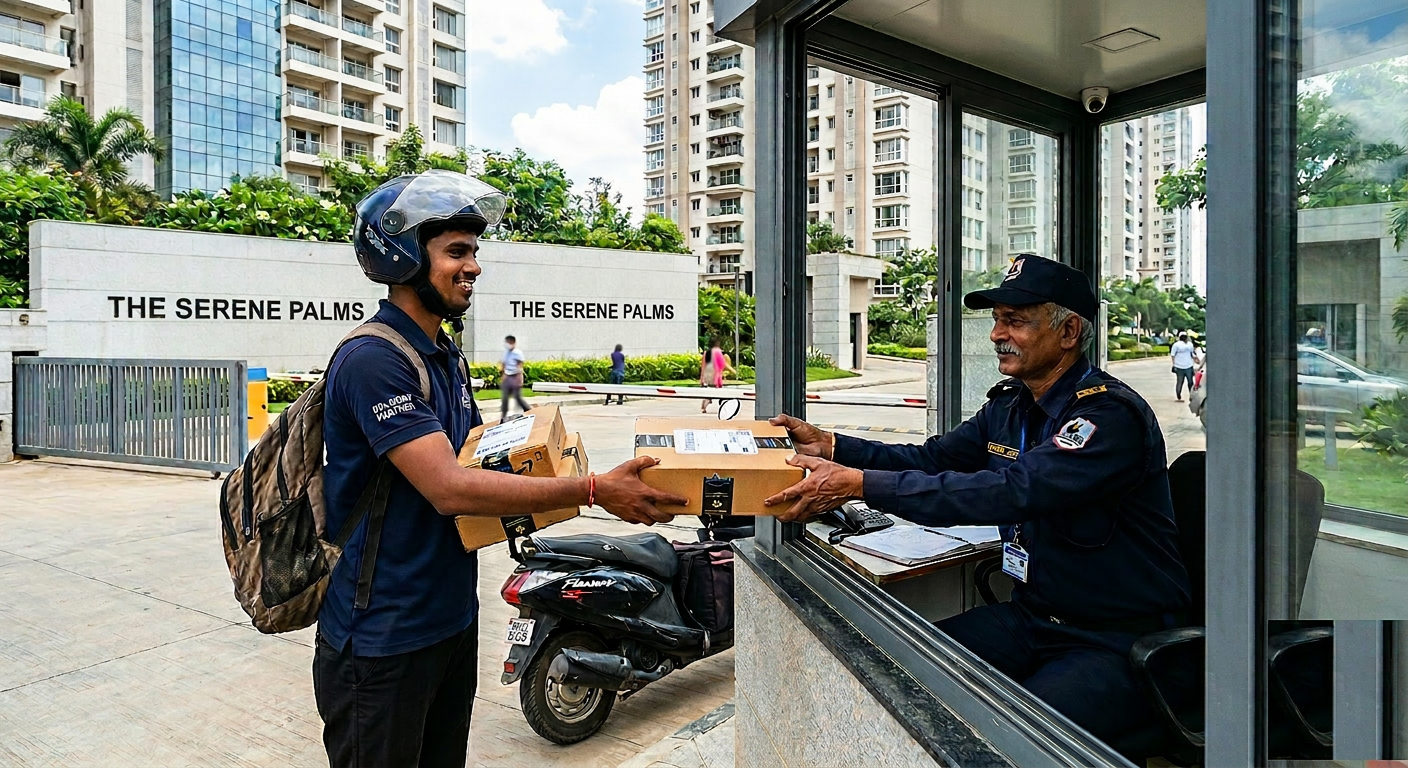
Delivery person handing a parcel to a security guard who is photographing it with a phone at an apartment gate

Parcel Collected At Gate

Amazon · Flat 6C · 2:14 PM

Photo Logged

Timestamped · Guard ID verified

Parcel Management

From arrival at the gate to collection by the resident — every parcel is tracked.

No manual registers. No forgotten packages. No disputes about what arrived, when, and who collected it.

Instant parcel arrival notification with photo

The moment a parcel is logged at the gate, the resident receives a push notification with the parcel photo, sender details, and timestamp. Residents who are at work, travelling, or simply not expecting a delivery know within seconds that their package has arrived and what it looks like. No phone call to the gate. No coming home to an empty lobby.

  • Instant notification the moment the parcel is logged — no delay
  • Photo of the parcel attached to the notification — resident can identify it before collecting
  • Notification shows which guard accepted the parcel — accountability is immediate
  • Works even when the resident is away — notification reaches them wherever they are
  • Parcel photo is timestamped and stored — permanent record of condition at arrival
In Practice

A resident is in a client meeting when her notification shows an Amazon package has arrived. She sees the photo — it is the laptop stand she ordered. She forwards her collection OTP to her husband who is working from home. He collects it that afternoon. She never had to think about it.

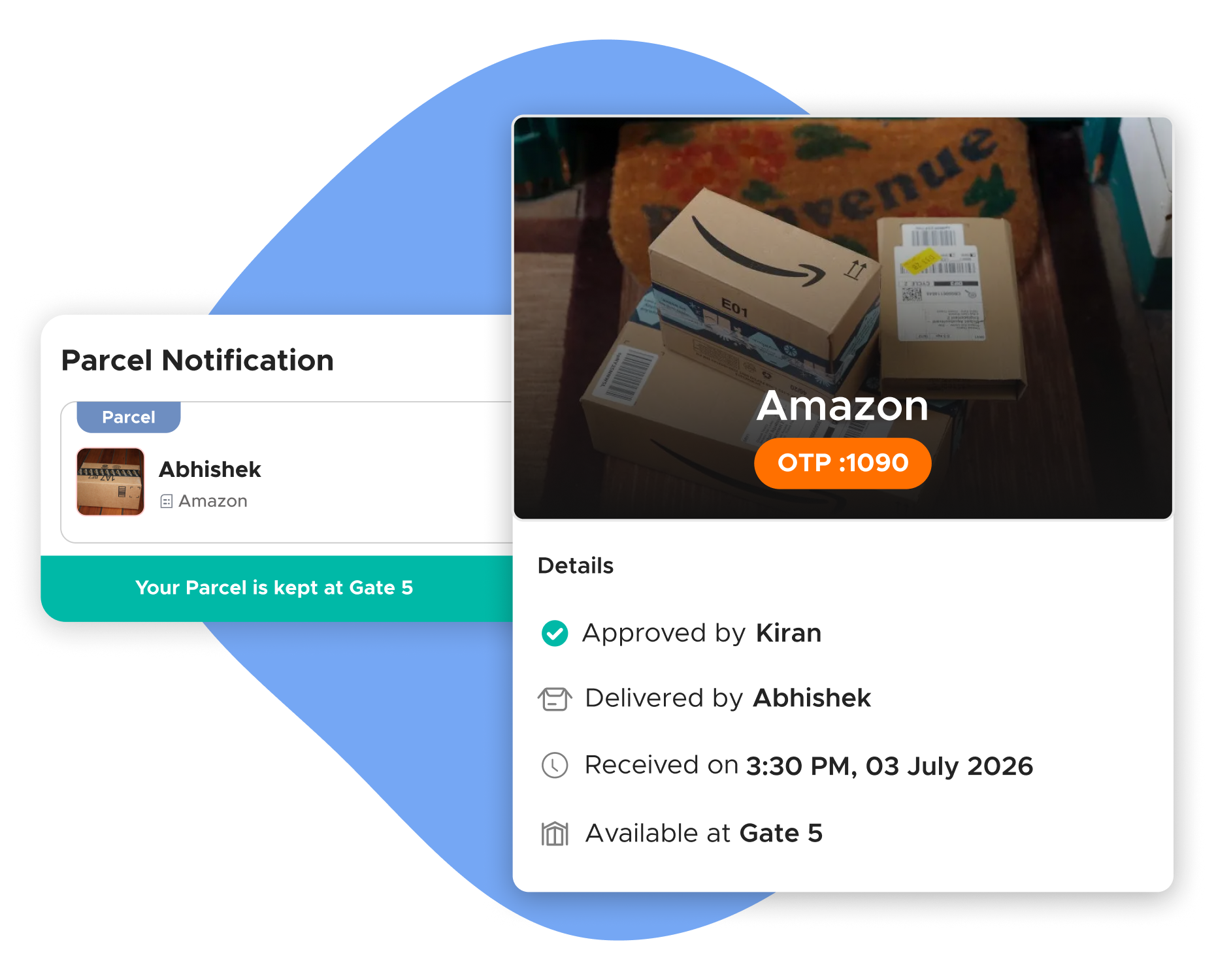
Resident's phone showing parcel arrival notification with photo, OTP, and delivery details

OTP-based secure handover

When a resident comes to collect, or sends someone on their behalf, the handover requires an OTP sent to the resident's registered mobile. No OTP, no parcel. This means parcels can only be collected by someone the resident has explicitly authorised — by choosing to share their OTP with them. A neighbour who claims to be collecting on the resident's behalf, a helper who arrives without the code, a delivery agent returning to reclaim a parcel — none of them can collect without the OTP.

Key Advantages
  • Parcel cannot be handed over without resident-authorised OTP
  • Resident controls who collects by choosing who to share the OTP with
  • Guard is protected — they have a verifiable record that the correct person collected
  • OTP confirmation logged with collection time — full chain of custody
  • Works for third-party collection — resident shares OTP with helper, family member, or colleague
In Practice

A resident's elderly mother arrives at the gate to collect a parcel. The guard asks for the OTP. The resident, who is at the office, receives the OTP request notification, sees her mother is at the gate, and forwards the OTP via WhatsApp. Her mother shares it with the guard. Parcel collected. Both resident and guard have a record.

Photo documentation — parcel condition at arrival

Every parcel accepted at the gate is photographed by the guard before logging. The photo is timestamped and attached to the parcel record. If a resident later claims the parcel arrived damaged, or that a different package was handed over than what was logged, the photo is the evidence. The guard who accepted it is identified by their passcode. The condition of the parcel at arrival is documented before it ever leaves the guard's hands.

Key Advantages
  • Every parcel photographed at acceptance — condition documented before storage
  • Photo is timestamped — arrival time and condition are simultaneously verified
  • Guard identity linked to the photo via their passcode login
  • Eliminates disputes about whether a parcel was damaged before or after gate acceptance
  • Photo stored in the parcel record — accessible to resident, guard, and admin
In Practice

A resident claims their parcel arrived with a torn seal and suspects the contents were tampered with at the gate. The admin pulls up the parcel record — the arrival photo shows the parcel sealed and intact. The issue is with the courier, not the gate. The guard is cleared, the resident contacts the courier, and the dispute is resolved in minutes.

Parcel history — complete log per unit

Every parcel ever received for a unit is stored in the ADDA app — sender name, arrival time, collection time, collected by whom, photo, and OTP confirmation. This is the resident's own archive of all parcel activity for their unit. For residents who order frequently, this log is the reference point for any delivery dispute with a courier company. For the MC, it is the audit record for any gate-level dispute.

Key Advantages
  • Complete parcel history available from the resident's app — no need to ask the guard
  • Filterable by date — residents can search for a specific delivery quickly
  • Exportable for the MC — useful for security investigations or insurance claims
  • Shows collection method — direct OTP, delegated collection, or collection centre
  • Permanent record — not deleted when the guard changes or a new register is started
In Practice

A resident disputes a delivery company's claim that a parcel was successfully delivered three weeks ago. She opens her parcel history, searches the date, and finds no record of that parcel arriving at the gate. This is evidence that the delivery agent did not deliver to the gate — she shares the screenshot with the courier for the claim.

Pending parcels list — no parcel left behind

Guards have a live view of all parcels currently held at the gate or collection centre — unit number, arrival time, and how long the parcel has been waiting. Parcels held beyond the configured threshold are flagged in the list. When the admin sets a long-hold alert, the system automatically re-notifies the resident and alerts the admin if the parcel remains uncollected beyond a second threshold.

Key Advantages
  • Guards see all held parcels in one live list — nothing is forgotten or lost in a physical pile
  • Long-hold alerts trigger automatic re-notification to the resident
  • Admin receives escalation alert for parcels uncollected beyond threshold
  • Prevents parcels from accumulating at the gate without resident awareness
  • Shift handover is clean — incoming guard sees exactly what parcels are pending
In Practice

A parcel has been at the gate for 28 hours. The system triggers an automatic re-notification to the resident. The resident, who had been travelling, sees the notification and instructs her helper to collect the next morning. The parcel is collected before the admin escalation threshold is reached.

Reports that the MC actually uses

Reports management committees actually use

The same dashboards that power visitor oversight cover parcel entries — one place to look for everything that happens at the gate.

Daily parcel count in Usage Summary

The Usage Summary dashboard shows the running parcel count alongside the daily visitor count. In communities using the system for more than six months, the accumulated parcel total often reaches into the tens of thousands — in one live community the total parcel count sitting in the system was 10,987. That is nearly 11,000 parcels logged, tracked, and handed over for a single community.

The 'Pending Parcels' count at any moment shows how many parcels are currently held at the gate or collection centre without a recorded handover. Review at end of shift to confirm nothing is forgotten.

What to watch for

A sudden drop in daily parcel count vs. expected delivery volume — logging discipline has lapsed. A growing pending parcels count week-over-week — collection follow-up is failing. Any parcel record without an arrival photo if mandatory photo capture is configured.

Incident Investigator — parcel records

The same Incident Investigator used for visitor logs also covers parcel entries. Filter by date range, unit, gate, or sender. Every parcel record shows arrival time, collection time, guard who accepted, photo, and OTP confirmation. Use this to resolve any dispute about whether a parcel was received or who collected it — the evidence is immediate and timestamped.

From the field

What ADDA has observed about parcel management across 25,000+ Communities

The scale of parcels

In communities using ADDA for six months or more, accumulated parcel logs often reach into the tens of thousands.

Without a digital system, managing this volume through a paper register and verbal notification is not operationally possible. Things will go missing. Guards will forget. Residents will dispute. The disputes damage the relationship between residents and the security team, and the MC ends up mediating conflicts that a simple digital log would have prevented entirely.

ADDA Gatekeeper replaces the paper register with a structured, photo-documented, OTP-verified parcel system that makes every arrival and every handover a permanent record.


Lesson 01

The communities with the fewest parcel disputes are not the ones with the most disciplined guards — they are the ones with the most complete logging.

The system does not require the guard to remember. It requires the guard to log. The notification to the resident is the proof that the guard logged it. If there is no notification, there is no log — and the guard's manual claim becomes the only record, which is exactly what causes disputes in the first place.

Make logging the only acceptable form of accepting a parcel. The paper register stops being the source of truth on day one of go-live.

Lesson 02

OTP-based handover protects the guard, not just the resident — and that framing is what gets guards to adopt it.

Guards initially resist OTP because it feels slower than handing a parcel based on the resident's face or verbal confirmation. The fix is not enforcement — it is framing. A guard who hands over a parcel without OTP has no proof that the right person collected it. If the resident later disputes the handover, the guard has no defence. Once guards understand the OTP log is their own protection, adoption follows.

Operator's Playbook

How parcel management actually runs on ADDA

Everything below is rendered as plain content — visible to residents, MC members, and AI search engines without any clicks.

How does parcel management work in ADDA Gatekeeper?

When a parcel arrives at the gate

The delivery agent arrives and hands the parcel to the guard. The guard opens the Gatekeeper app, selects Parcel Management, enters the parcel details — resident unit, sender or courier company name, and any visible parcel identifier — and captures a photo of the parcel. The system logs the parcel with a timestamp and the guard who accepted it. An instant notification goes to the resident: parcel arrived, photo attached, held at gate.

When the resident comes to collect

The resident arrives at the gate and tells the guard they are here to collect a parcel. The guard looks up the parcel by unit number, locates the physical parcel, and initiates OTP-based handover. An OTP is sent to the resident's registered mobile number. The resident shares the OTP with the guard. The guard enters it in the system. The handover is confirmed and the parcel record is closed — with collection time and OTP verification logged.

If the resident sends someone else to collect on their behalf — a family member, a helper — the process is the same. The OTP goes to the resident's phone. The resident shares it with the person collecting. The guard does not hand over without a valid OTP. This prevents parcels from being handed to anyone who simply claims to be from the right flat.

When the resident is not home and wants a helper to collect

The resident can share their collection OTP directly with their helper. The helper arrives, presents the OTP to the guard, and collects. The resident receives confirmation of collection time. No phone call to the gate needed.

Resident view

Parcel arrival notification. The moment a guard logs a parcel as received, the resident gets a push notification with the parcel details and the guard's photo of the package. The resident knows their parcel has arrived, where it is being held, and what it looks like — without calling the gate or waiting to come home and check.

Collection options. From the notification or the ADDA app, the resident can see the parcel status — held at gate, or collected. If they want someone else to collect on their behalf, they share their OTP. If they want to collect themselves, they come to the gate with their OTP ready.

Parcel history. Every parcel ever received and collected for the resident's unit is recorded in the app — sender, arrival time, collection time, photo, and OTP confirmation. This history is the resident's own record. If a dispute arises about whether a parcel was received or when it was collected, the resident has the full log on their phone.

Collection centre option. For communities that have set up a dedicated parcel collection centre rather than holding parcels at the gate, ADDA supports this workflow. The guard accepts and logs parcels at the gate, they are moved to the collection centre, and the resident collects from there. The digital log tracks the parcel through both locations — accepted at gate, transferred to collection centre, collected by resident.

Guard view

Parcel acceptance workflow

  1. Delivery agent arrives with parcel at gate
  2. Guard opens Gatekeeper app → Parcel Management → New Parcel
  3. Enters unit number, sender or courier name, and any visible parcel reference
  4. Captures a photo of the parcel — clearly showing the label and condition
  5. Submits — resident is notified instantly, parcel is logged with timestamp and guard identity

Parcel collection workflow

  1. Resident or authorised person arrives to collect
  2. Guard looks up parcel by unit number in the Parcel Management list
  3. Locates the physical parcel
  4. Initiates OTP handover — OTP is sent to the resident's registered number
  5. Resident or their representative shares the OTP
  6. Guard enters OTP in the app — handover is confirmed, record is closed with collection time

Pending parcels list. The guard has a live list of all parcels currently held — unit number, parcel description, arrival time, and how long the parcel has been waiting. Parcels that have been held for longer than a configured period are flagged — the guard is prompted to notify the resident again.

What the guard cannot do

  • Hand over a parcel without OTP confirmation
  • Delete or edit a logged parcel entry
  • Log a parcel without a photo if photo capture is enabled by the admin

Admin and MC configurations

Photo capture requirement. Enable mandatory photo capture for all parcel acceptances. When enabled, the guard cannot complete the parcel log without attaching a photo. This is the single most effective configuration for eliminating parcel disputes — a timestamped photo of every parcel at arrival creates evidence that is almost impossible to dispute.

Collection centre setup. For communities with a dedicated parcel room or collection desk, the admin configures this as a separate location in the system. Parcels are accepted at the gate and transferred to the collection centre — the transfer is logged as a separate step. The resident's notification shows the parcel is at the collection centre, not the gate.

Parcel notification settings. Configure whether notifications go to all unit members or only the primary resident. For units where a tenant manages parcels independently of the owner, this setting ensures the right person is notified.

Long-hold alerts. Configure the duration after which an uncollected parcel triggers an escalation alert — to the guard to re-notify the resident, and to the admin if the parcel remains uncollected beyond a second threshold. This prevents parcels from sitting at the gate for days without the resident knowing or the guard following up.

Recommended settings before going live

  • Enable mandatory photo capture for all parcel acceptances
  • Configure long-hold alert at 24 hours for standard parcels
  • Set up collection centre location if the community uses a dedicated parcel room
  • Train guards on OTP handover process before going live — this is the step most guards initially resist because it feels slower, but it eliminates disputes entirely

Common failure modes and how to fix them

Guard not logging parcels in the system — using paper register instead

The most common failure in the first weeks. Guards default to familiar habits. Parcels are accepted and written in the old register. No notification goes to the resident. The digital log is empty.

Fix: Make parcel logging in the app a mandatory, verifiable step — the resident notification is the proof that the guard logged it. If a resident complains they received no parcel notification but the guard says they accepted it, check the Incident Investigator. If there is no digital record, the guard did not log it. Use the first such instance as a training moment, not a disciplinary one. After two to three such incidents with the same guard, escalate.

Guard handing over parcel without OTP — to avoid friction at the gate

Guards find OTP verification slow, especially when there is a queue. They hand over parcels based on the resident's face or verbal confirmation.

Fix: Reinforce during training that the OTP process protects the guard as much as the resident. A guard who hands over a parcel without OTP has no proof that the right person collected it. If the resident later claims they never received it, the guard has no defence. The OTP log is the guard's protection. Frame it as self-protection, not bureaucracy.

Resident claims parcel never arrived — but guard says it was delivered

Classic dispute with no evidence on either side in communities without digital logging.

Fix: With ADDA's photo documentation and timestamped log, this dispute is resolved immediately. Pull the parcel record from the Incident Investigator. If the record exists with photo and timestamp, the parcel arrived. If it does not exist, the delivery agent did not deliver to the gate. Either way, the answer is immediate and evidence-based.

Parcel held for multiple days — resident not informed

Guard accepted the parcel but the notification was not sent, or the resident missed it and forgot.

Fix: Enable long-hold alerts in the admin configuration. Set the first alert at 24 hours — automatic re-notification to the resident. Set the second threshold at 48 hours — admin escalation. The system handles re-notification automatically. Guards should also check the pending parcels list at shift handover and verbally follow up on any parcel held more than 24 hours.

Multiple parcels for the same unit — guard confused about which belongs to whom

In units with multiple residents or families, multiple parcels arrive from different senders. The guard is unsure which parcel matches which collection request.

Fix: Every parcel in the system is logged with sender name and a photo. When the resident presents their OTP, the guard pulls up the specific parcel by unit and sender name, matches it to the physical package, and hands over the correct one. If the resident is not sure which parcel they are collecting, they can check their own parcel history in the app — sender name and photo are visible.

Guard SOP — parcel management

On parcel arrival

  1. Accept the parcel from the delivery agent
  2. Open Gatekeeper app → Parcel Management → New Parcel
  3. Enter unit number and sender or courier name
  4. Capture a clear photo of the parcel showing the label and condition
  5. Submit — resident notification is sent automatically
  6. Place the parcel in the designated holding area, keeping it organised by unit

On parcel collection

  1. Resident or authorised person arrives to collect
  2. Open Parcel Management → find parcel by unit number
  3. Match the physical parcel to the digital record
  4. Initiate OTP handover — OTP is sent to the resident's phone
  5. Resident or their representative shares the OTP
  6. Enter OTP in the app — if valid, confirm handover
  7. Hand over parcel — record is closed with collection timestamp

If a person wants to collect without an OTP

  1. Do not hand over the parcel
  2. Ask the person to contact the resident and obtain the OTP
  3. If the resident is genuinely unreachable and the situation is urgent, call the admin
  4. Admin can authorise a manual override with reason logged
  5. Never hand over a parcel without either OTP confirmation or admin override — no exceptions

At shift handover

  1. Open Pending Parcels list
  2. Review all parcels currently held — unit, arrival time, duration
  3. Brief incoming guard on any parcel held more than 24 hours
  4. Confirm physical parcels in the holding area match the digital list
  5. Any discrepancy between physical count and digital list must be flagged to the admin before handover is complete

MC runbook — parcel management oversight

Daily

  • Check Pending Parcels list — any parcel held more than 24 hours should have triggered a re-notification
  • Confirm all guards are logging parcels digitally — if the daily parcel count in the system is significantly lower than expected deliveries, logging discipline has lapsed

Weekly

  • Review parcel log in Incident Investigator — spot-check 5 to 10 entries for completeness: photo present, sender logged, collection confirmed with OTP
  • Check whether any parcel records show manual override on collection — OTP bypassed. If frequency is high, retrain guards on why OTP matters

Monthly

  • Export parcel log for the month from Incident Investigator
  • Review any open parcel disputes from residents — use the log and photos to resolve
  • Confirm collection centre inventory matches digital records if a dedicated parcel room is in use

Trusted across India's leading communities since 2009

Gartner — Category Leader
Capterra — Shortlist
ET Real Estate Awards — Best Housing Society ERP
Software Suggest — Best Support
Software Advice — FrontRunners
100%

Ad-Free, Always

Privacy

Focused by Design

4.7

App Store Rating

1,250+

Features Built-in

DPDP & ISO

Certified

16+

Years of Leadership

Let's Talk

Bring every parcel onto one verified system

See how 25,000+ housing societies eliminate parcel disputes with photo-documented, OTP-verified handovers.

Got questions?

Frequently Asked Questions